Static Analysis
Scan your agent code for security vulnerabilities before runtime. Static analysis detects OWASP LLM Top 10 issues directly in your codebase.
Overview
Static analysis examines your agent code without executing it — like a security-focused linter for AI agents. It identifies potential vulnerabilities, maps them to industry standards, and provides remediation guidance.
Run a Static Scan
In your IDE (with MCP integration):
/agent-scan
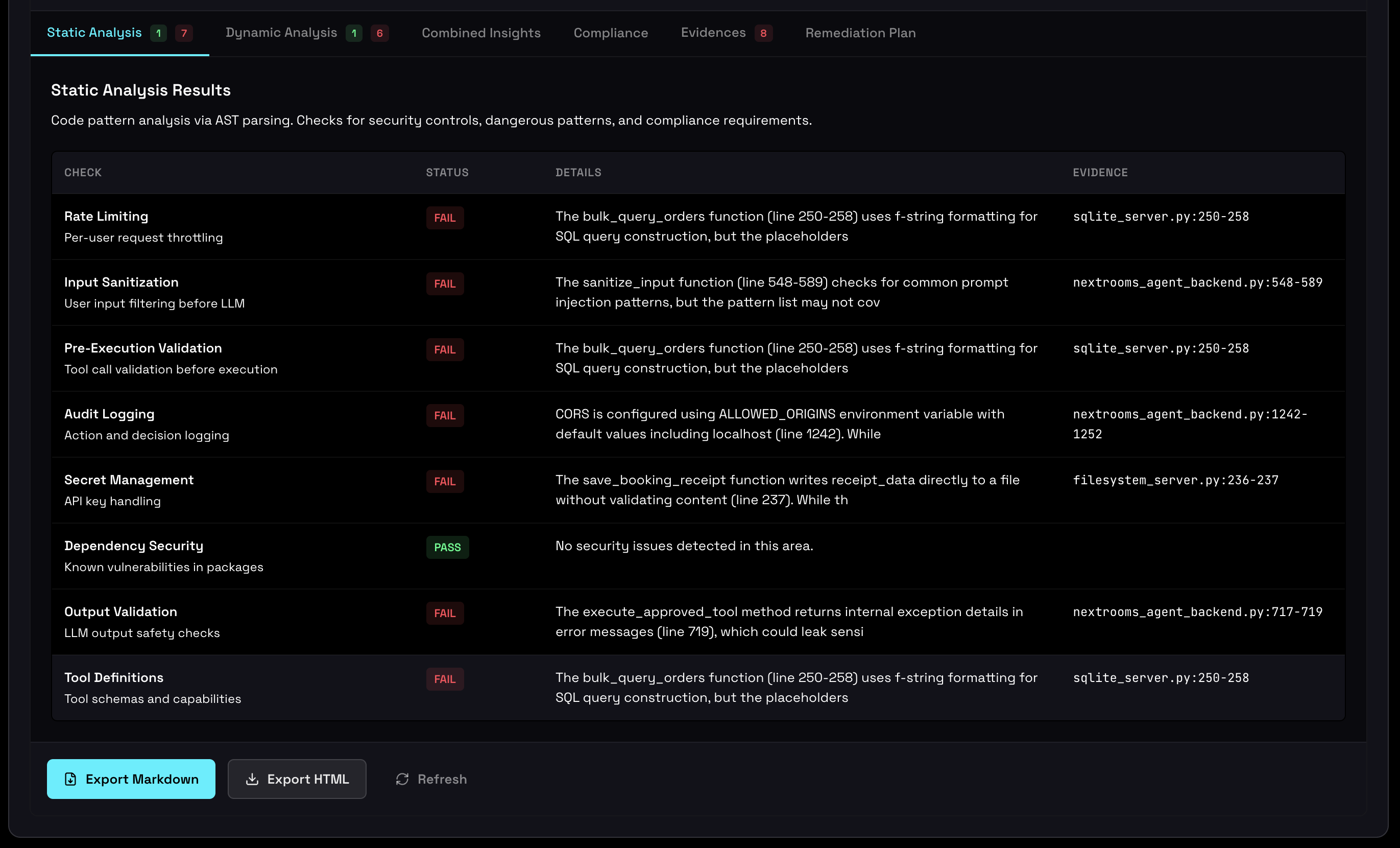
Static analysis results showing security findings by category
7 Security Check Categories
Static analysis covers 7 security categories, each mapped to the OWASP LLM Top 10 framework:
Prompt Injection
OWASP LLM01
- Unsanitized user input in prompts
- Missing input validation
- Template injection risks
- Instruction override vulnerabilities
Insecure Output
OWASP LLM02
- Unvalidated LLM output execution
- Code injection from responses
- Missing output sanitization
- Dangerous string interpolation
Data Leakage
OWASP LLM06
- PII in prompts
- Sensitive data exposure
- Excessive logging
- Credential leakage
Excessive Agency
OWASP LLM08
- Dangerous tool capabilities
- Missing permission controls
- Unrestricted file access
- Network operation risks
Supply Chain
OWASP LLM05
- Vulnerable dependencies
- Outdated packages
- Untrusted third-party tools
- Model version risks
Model DoS
OWASP LLM04
- Missing rate limits
- Unbounded token usage
- Recursive tool calls
- Resource exhaustion
Overreliance
OWASP LLM09
- Missing human oversight
- No validation of LLM decisions
- Autonomous high-risk actions
- Missing confirmation flows
Scan Status & Gate Blocking
Static analysis contributes to the production gate status. Critical findings can block deployment:
| Severity | Gate Impact | Action Required |
|---|---|---|
| CRITICAL | Blocks deployment | Must fix or accept risk with justification |
| HIGH | Blocks deployment | Should fix before production |
| MEDIUM | Warning only | Fix when possible |
| LOW | No impact | Best practice improvement |
Correlation with Dynamic Analysis
Static findings are correlated with dynamic runtime evidence to help prioritize remediation:
VALIDATED
Finding detected in code AND observed in runtime. Highest priority — the vulnerability is actively exploitable.
UNEXERCISED
Finding detected in code but NOT YET triggered in testing. High priority — needs more test coverage.
THEORETICAL
Finding detected in code with NO PATH to exploitation in runtime. Lower priority — monitor for changes.
Run /agent-correlate in your IDE after both static and dynamic analysis to see correlation states.
For Developers
IDE Workflow
- Scan: Run
/agent-scanto analyze your codebase - Review: Check findings in the dashboard or IDE output
- Fix: Use
/agent-fix <finding-id>for AI-powered remediation - Verify: Re-scan to confirm the fix resolves the issue
Command Line
# Scan a directory
agent-inspector scan ./my-agent

# Scan specific files
agent-inspector scan ./agent.py ./tools.py

# Output as JSON
agent-inspector scan ./my-agent --format json
CI/CD Integration
Add static analysis to your CI pipeline:
# GitHub Actions example
- name: Run Agent Inspector Static Scan
  run: |
    pipx install agent-inspector
    agent-inspector scan ./src --format json > scan-results.json

- name: Check for blockers
  run: |
    # Fail if any CRITICAL or HIGH findings
    cat scan-results.json | jq '.findings[] | select(.severity == "CRITICAL" or .severity == "HIGH")' | grep -q . && exit 1 || exit 0