Dynamic Analysis
Monitor your agent during runtime to detect behavioral issues, anomalies, and security risks that only emerge during execution.
Overview
Dynamic analysis observes your agent's actual behavior as it runs. By analyzing runtime patterns across multiple sessions, it detects issues that static analysis can't catch — like behavioral inconsistencies, unexpected tool usage, and runtime anomalies.
Run Dynamic Analysis
- Point your agent to
http://localhost:4000 - Run 20+ test sessions with varied inputs
- Use
/agent-analyzein your IDE to see results
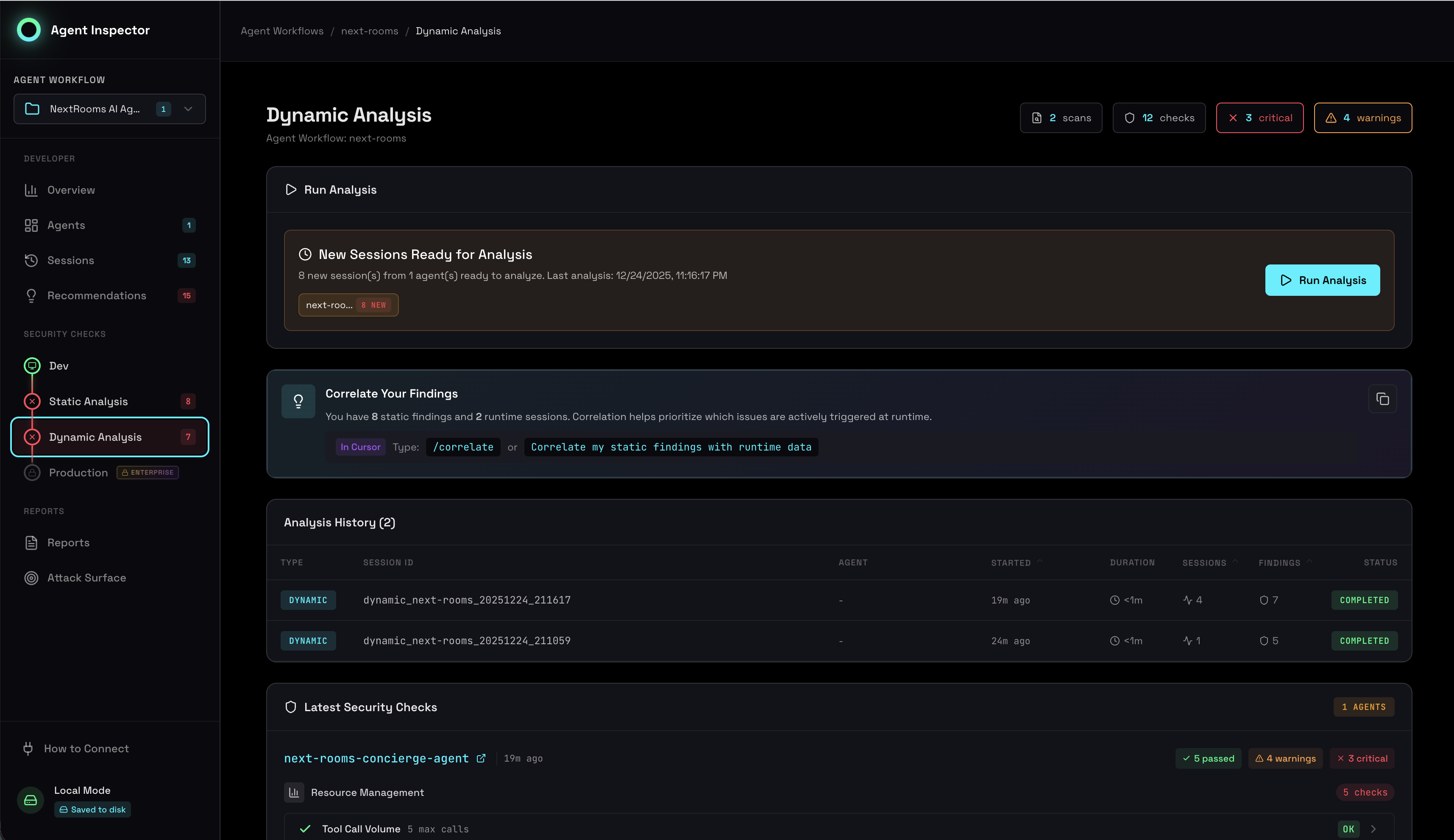
Dynamic analysis showing runtime security checks and behavioral metrics
16 Security Checks in 4 Categories
Dynamic analysis runs 16 security checks across 4 categories:
Resource Management
- Token Budgets: Detect usage spikes and budget overruns
- Session Duration: Identify runaway sessions
- Tool Call Frequency: Catch recursive or excessive calls
- Cost Anomalies: Flag unexpected cost patterns
Environment & Supply Chain
- Model Versions: Track model drift and updates
- Tool Adoption: Monitor new tool usage
- API Endpoints: Detect unauthorized external calls
- Configuration Drift: Flag parameter changes
Behavioral Stability
- Consistency Score: Measure output predictability
- Cluster Analysis: Identify behavioral modes
- Outlier Detection: Flag anomalous sessions
- Stability Trends: Track behavioral drift over time
Privacy & PII
- PII Detection: Scan prompts and responses
- Sensitive Data: Identify credential exposure
- Data Retention: Detect excessive data storage
- Cross-Session Leakage: Catch context pollution
Per-Agent Analysis
Dynamic analysis runs separately for each agent (identified by workflow ID). This lets you compare security posture across different agents:
# Include workflow ID in the base URL
http://localhost:4000/agent-workflow/{AGENT_WORKFLOW_ID}
Use the same agent_workflow_id when running static scans to correlate findings.
The dashboard shows analysis results per-agent, with aggregate views across all agents.
Incremental Analysis
Dynamic analysis runs incrementally as new sessions complete. You don't need to wait for all sessions to finish:
| Sessions | Analysis Available |
|---|---|
| 5+ | Basic behavioral patterns |
| 10+ | Outlier detection, stability scores |
| 20+ | Full clustering, high-confidence metrics |
| 50+ | Trend analysis, statistical significance |
Auto-Resolve
Some dynamic findings automatically resolve when runtime evidence contradicts them:
- Resource limits: If token usage stays within bounds across many sessions, over-budget warnings resolve
- Behavioral anomalies: If outlier behavior normalizes, the finding resolves
- PII exposure: If subsequent sessions show proper redaction, the finding resolves
Auto-resolved findings can re-open if the issue recurs. Manual dismissals (Risk Accepted, False Positive) remain dismissed.
For Developers
Setup
# Start Agent Inspector
uvx agent-inspector anthropic  # or: openai

# Point your agent to the proxy
client = Anthropic(base_url="http://localhost:4000")
Running Sessions
# Run varied test inputs
test_prompts = [
    "Normal customer inquiry",
    "Edge case: empty input",
    "Edge case: very long input",
    "Adversarial: prompt injection attempt",
    # ... more test cases
]

for prompt in test_prompts:
    agent.run(prompt)  # Each run = 1 session
Viewing Results
- Dashboard: Open
http://localhost:7100 - IDE: Run
/agent-analyzefor a summary - API: Query
http://localhost:7100/api/analysis
Correlation
After running both static and dynamic analysis, correlate findings to prioritize:
/agent-correlate