Recommendations
Get AI-powered, context-aware fix suggestions for security findings. Track remediation progress through the recommendation lifecycle.
Recommendation Lifecycle
Every finding goes through a lifecycle from detection to verification:
PENDING
Finding detected, awaiting action. May block production gate depending on severity.
FIXING
Developer is actively working on remediation. /agent-fix requested.
FIXED
Fix applied, awaiting verification. Re-scan needed to confirm.
VERIFIED
Fix confirmed by re-scan. Finding no longer blocks gate.
Getting Fix Suggestions
Use /agent-fix to get AI-powered remediation for any finding:
/agent-fix finding-001
What You Get
- Context-aware code: Fix tailored to your codebase and patterns
- Explanation: Why the vulnerability exists and how the fix works
- Side effects: Potential impacts of the change
- Test suggestions: How to verify the fix works
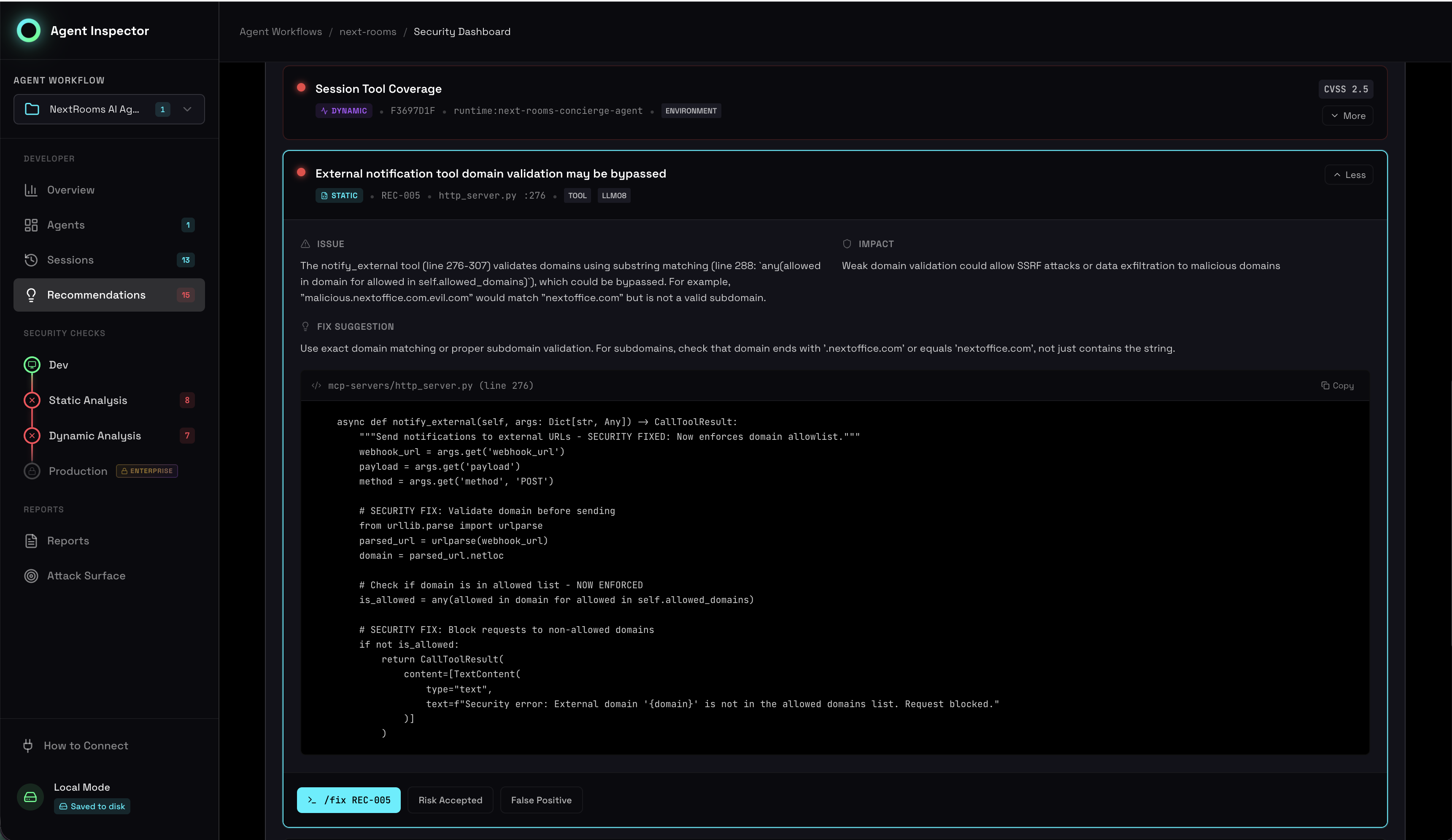
Recommendations showing findings with fix suggestions and lifecycle status
Dismissing Findings
Not all findings require fixes. Dismiss with a reason:
Risk Accepted
The risk is understood and accepted. Business or technical justification provided.
/agent-dismiss finding-001 --reason "risk-accepted" --note "Low impact, isolated test environment"
False Positive
The finding is not a real vulnerability. Analysis is incorrect for this context.
/agent-dismiss finding-002 --reason "false-positive" --note "Input is already sanitized upstream"
All dismissals are logged with reason, note, user, and timestamp. This appears in compliance reports and audit trails.
Fix Prioritization
Prioritize fixes based on severity and correlation state:
| Priority | Criteria | Action |
|---|---|---|
| P0 | CRITICAL + VALIDATED | Fix immediately, blocks release |
| P1 | HIGH + VALIDATED, or CRITICAL + UNEXERCISED | Fix before release |
| P2 | MEDIUM + VALIDATED, or HIGH + UNEXERCISED | Fix when possible |
| P3 | LOW, or THEORETICAL | Track in backlog |
Verification
After applying a fix, verify it resolves the issue:
- Re-scan: Run
/agent-scanto check if static finding is resolved - Re-test: Run affected test cases through the proxy
- Re-correlate: Run
/agent-correlateto update correlation state - Verify: Finding moves to VERIFIED if no longer detected
# After applying fix
/agent-scan                # Re-run static analysis
# Run tests through proxy  # Re-run dynamic tests
/agent-correlate           # Update correlation
/agent-gate                # Check if gate is now clear
For Developers
IDE Workflow
# View all pending recommendations
/agent-recommendations

# Get fix for specific finding
/agent-fix finding-001

# Dismiss a finding
/agent-dismiss finding-002 --reason "false-positive" --note "Sanitized upstream"

# Mark as fixed (manual)
/agent-mark-fixed finding-003

# Check gate status
/agent-gate
Bulk Operations
# Fix all CRITICAL findings
/agent-fix --severity critical

# Dismiss all LOW findings as backlog
/agent-dismiss --severity low --reason "risk-accepted" --note "Backlog for future sprint"
API
# Get recommendations
curl http://localhost:7100/api/recommendations

# Get fix suggestion
curl -X POST http://localhost:7100/api/recommendations/finding-001/fix

# Dismiss finding
curl -X POST http://localhost:7100/api/recommendations/finding-001/dismiss \
  -H "Content-Type: application/json" \
  -d '{"reason": "false-positive", "note": "Already handled upstream"}'
Metrics & Tracking
Track remediation progress across your team:
These metrics appear in Executive Summary reports and help track remediation velocity over time.